
“We would promote and get 10–20 sales a week, then stop promoting and fall to 0–5 sales per week.”
That’s how one seller described turning ads off. Many sellers feel trapped in the same way.
You can sell on eBay without ads. But your listings have to rank on their own.
This guide explains what happens when you stop eBay Promoted Listings. You’ll see what eBay search rewards, which free fixes matter most, and a 2-week plan to cut your ad spend safely.
Yes, you can sell on eBay without Promoted Listings. eBay’s Best Match search ranks listings on relevance, popularity, price, listing quality, completeness, returns, handling time and your seller record. Ads aren’t on that list. Fill in item specifics, write clear titles, price competitively, ship fast, then lower ad rates step by step.
What happens when you turn eBay Promoted Listings off
Most sellers see fewer impressions right away. That’s normal, and it doesn’t mean eBay is punishing you.
Here is why. A promoted listing can show in two kinds of spots:
- Ad slots in search results and on product pages, which you pay for.
- Normal (organic) search results, ranked by Best Match.
When you stop promoting, the ad slots disappear. Your organic position depends on Best Match. If your views drop sharply, a big share of them probably came from ad spots.
One honest warning: fewer sales can make an item look less popular over time. That’s why you should cut ads in steps, not all at once.
eBay has two kinds of Promoted Listings:
| Pay when it sells (“general”) | Pay per click (“priority”) | |
|---|---|---|
| How you pay | A % of the sale you choose, from 2% to 100% | A fee each time someone clicks your ad |
| When you pay | Only if the item sells within 30 days of an ad click | On every click, even with no sale |
| Can it take the first ad spot in search? | No, not since January 13, 2026 | Yes, it’s eligible (not guaranteed) |
Ads also got more expensive for many US sellers this year. Since January 13, 2026, “pay when it sells” ads charge you on more sales (eBay’s announcement).
Here’s an example. On Monday, a buyer clicks your ad but doesn’t buy. On Friday, while the ad is still running, a different buyer finds your listing and buys it. eBay still charges your ad fee, because the sale came within 30 days of a click on your ad.
So ads still work. But you now pay ad fees on some sales the ads didn’t bring. That’s why every listing that can’t sell without ads costs you money.
How eBay search ranks listings without ads
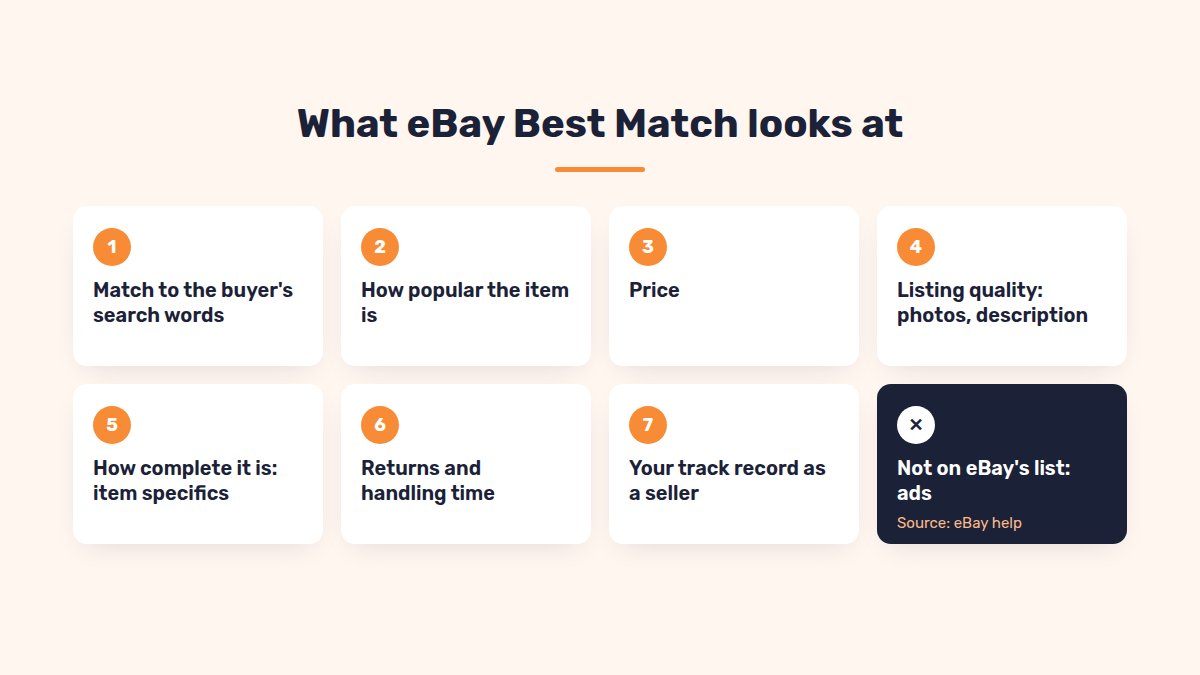
eBay’s search sort is called Best Match. eBay’s own help page lists what it looks at:
- How closely the listing matches the buyer’s search words
- How popular the item is
- The price
- The quality of the listing (description, photos)
- How complete the listing is
- Your terms, such as return policy and handling time
- Your track record as a seller
Promoted Listings isn’t on that list. Everything on it is something you can improve for free.
eBay doesn’t publish the exact formula, and it changes over time. Don’t chase tricks. Fix the basics on your best listings first.
Item specifics and titles: the free ranking levers
These two fixes cost nothing and help the most.
1. Fill in item specifics. Item specifics are the brand, size, color and other fields eBay asks for.
eBay says it plainly: buyers filter search results by item specifics. Your item only appears in those filtered results if you added the matching item specific.
A buyer searching “running shoes” might click Brand: Nike, Size: 10, Color: Black. A listing missing “Color” drops out of that view, even with a perfect title.
To fix this:
- Open a listing and look for Required and Recommended item specifics.
- Fill in every one that’s true for the item. eBay picks recommended ones from what buyers search for.
- Use eBay’s suggested values where you can, for example “Black”, not “Blk”.
- Don’t add values that aren’t true. Wrong sizes or brands bring the wrong buyers and returns.
2. Write titles buyers actually search. Titles can be up to 80 characters. Use them well:
| Weak title | Better title | |
|---|---|---|
| Example | Great Shoes Look!! Must See | Nike Air Zoom Pegasus 40 Men’s Running Shoes Size 10 Black |
| Brand and model | No | Yes |
| Size and color | No | Yes |
| Wasted words | “Great”, “Look”, “Must See” | None |
Put the words buyers type first: brand, model, product type, then size and color.
Fixing hundreds of listings by hand is the hard part.
Our item specifics optimizer shows all your listings in one grid, with required and recommended specifics highlighted. You can fill a value for every listing in a column at once. AI can also suggest better titles and fill missing specifics, 100 listings at a time.
Price, shipping and handling time: what buyers compare
Best Match looks at price and your listing terms, so these matter too.
- Check your price against sold listings. Search your item, then filter by Sold items. If you’re far above the market, ads were hiding that.
- Show shipping costs clearly. Many buyers compare the total price. Free shipping built into the price is often easier to compare.
- Ship fast. Choose same day or 1 business day handling if you can keep it every time.
- Offer 30-day free returns. Returns are part of your listing terms.
- Keep tracking on every order. eBay’s tips say to deliver on time and use tracking where possible.
Bonus: Top Rated Sellers can earn the Top Rated Plus seal. Listings need same or 1 business day handling and free returns of 30 days or more. Qualifying listings get 10% off final value fees, which helps you afford fewer ads.
Popularity and old listings: where to focus first
“How popular the item is” is one of the Best Match factors. In practice, listings that already get views and sales are your best organic sellers.
So don’t spread your effort evenly. Sort your listings into three groups:
| Group | What it looks like | What to do |
|---|---|---|
| Winners | Sales without ads | Keep them unpromoted, keep stock up |
| Ad-dependent | Sell only when promoted | Fix specifics, title, photos and price, then retest |
| Dead | No views for 90 days | Fix the listing, or end it if the item doesn’t sell anymore |
Many sellers say ending and relisting old items boosts them. eBay doesn’t confirm that. Fixing the listing itself is the safer bet.
Reach more buyers on other eBay sites
Your eBay.com listings mostly reach US buyers. eBay UK, Canada, Australia and Germany each have their own buyers and their own search results.
There are two ways in:
- Let eBay ship it abroad. eBay’s international shipping options show eligible US listings to buyers in other countries. Your listing stays in English.
- List directly on the other site. A listing on eBay.co.uk or eBay.de shows prices in the local currency and ranks in local searches. On eBay.de, that means a German title.
Local listings take more work. But they compete in searches where fewer US sellers show up, with no ad spend.
SellSetGo can list your best sellers on eBay UK, Canada, Australia, Germany, France, Italy, Spain and Ireland. It translates titles and descriptions, maps categories and fills item specifics. You set a markup and price rounding per country, and stock stays in sync across every site.
A 2-week plan to cut your ad spend
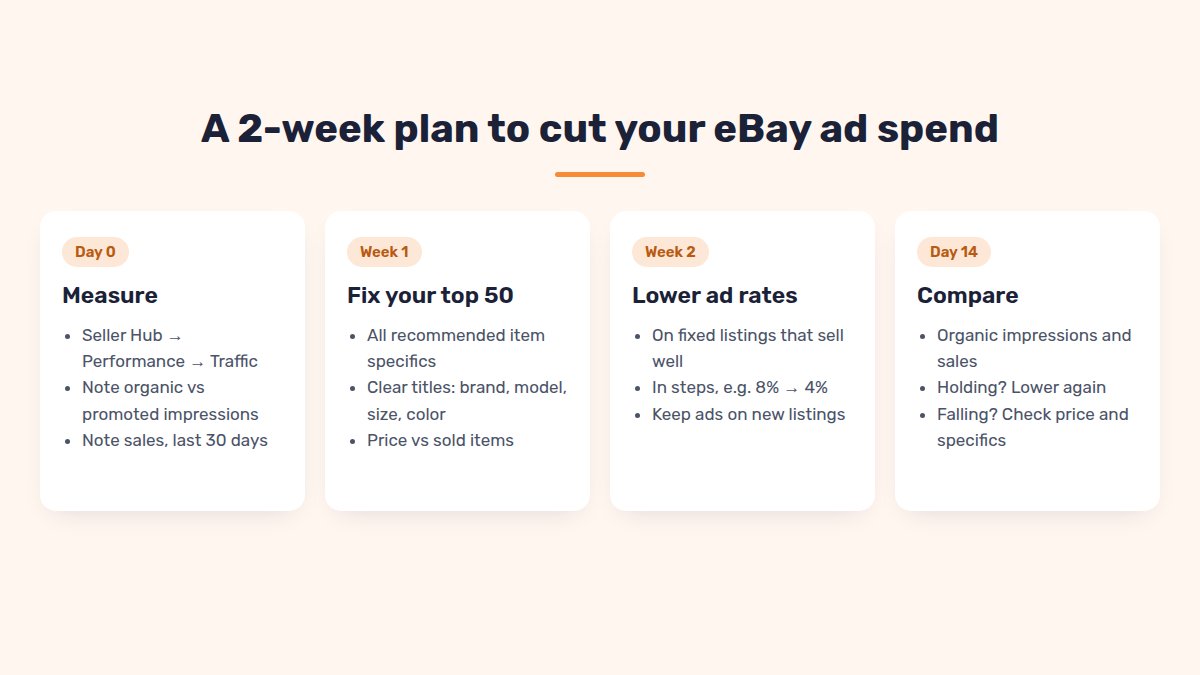
Don’t switch all ads off at once. Cut step by step, and watch the numbers.
Before you start: open Seller Hub → Performance → Traffic. Note your organic and promoted impressions, click-through rate and sales for the last 30 days.
Week 1: fix your top listings
- Pick your 50 best-selling listings.
- Fill every required and recommended item specific.
- Rewrite weak titles: brand, model, type, size, color.
- Check photos. eBay allows up to 24 for free.
- Check price against sold listings, then check handling time and returns.
Week 2: lower ad rates in steps
- Lower the ad rate on fixed listings that already sell well, for example from 8% to 4%.
- Keep ads on new listings with no sales history yet.
- After 7–14 days, compare organic impressions with your starting numbers. Judge sales over 2–4 weeks, since one week can be luck or season.
- If organic sales hold, lower again. If they fall, look at that listing’s price and specifics first.
Repeat the plan for your next 50 listings each month.
FAQ
Does eBay hide listings that aren’t promoted?+
eBay’s Best Match help page doesn’t list ads as a ranking factor. Unpromoted listings lose the ad placements and still show in organic results. Fewer sales can lower an item’s popularity over time, so cut ads in steps.
Is it worth paying for eBay Promoted Listings?+
It can be, for new listings or high-margin items. Check the Traffic report: if a listing only sells when promoted, fix the listing before raising the ad rate.
What ad rate should I use on eBay?+
“Pay when it sells” ads let you choose 2–100% of the total sale. Start low on listings that already sell organically. eBay’s suggested rate is a guide, not a must.
Why did my eBay views drop when I stopped promoting?+
You lost the ad slots. Your organic views depend on your listings’ Best Match strength: specifics, title, price, terms and seller record.
How long does it take to get organic views back?+
eBay doesn’t give a timeline. Fix your best listings first and compare impressions after 7–14 days. Judge sales over 2–4 weeks.
Conclusion
You don’t need ads on every listing to sell on eBay.
Fill in item specifics, write clear titles, price against sold items and ship fast. Then lower ad rates step by step, and keep ads only where they truly pay.
Want to fix item specifics and titles on thousands of listings?
SellSetGo fills missing item specifics and improves titles across your eBay listings in bulk, and lists your best sellers on other eBay sites.
Start your 15-day free trialBook a free demo