
How to Bulk Edit eBay Item Specifics for 1000s of Listings Using SellSetGo
Need to update a brand name, material type, or any other item specific across thousands of eBay listings? With SellSetGo, you can do it in minutes — no manual editing required.
Here’s the exact process using a simple CSV file.
Item specifics are critical for eBay search visibility, but updating them one listing at a time is painfully slow.
SellSetGo’s CSV import feature lets you bulk-revise item specifics across your entire catalogue in just a few steps. Let’s walk through it.
Step 1: Download a Report of Your Active Listings
Go to Reports in your SellSetGo sidebar. Select your marketplace (e.g. EBAY_GB) from the Marketplace dropdown and set the product status to Active.
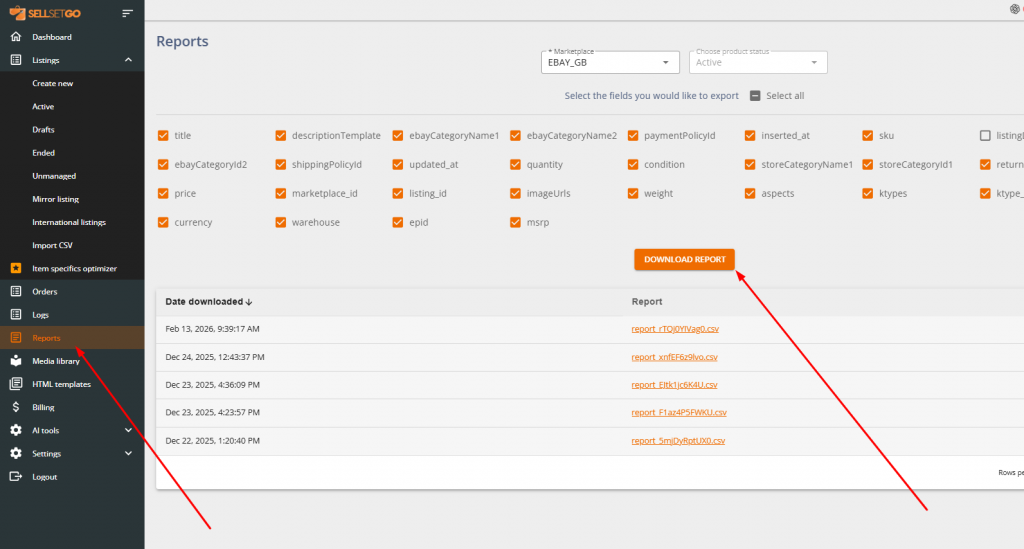
Choose the fields you want to include in your export.
Click Download Report, then download the CSV to your computer.
Step 2: Copy the SellSetGo Internal IDs
Open the downloaded CSV in Excel or Google Sheets.
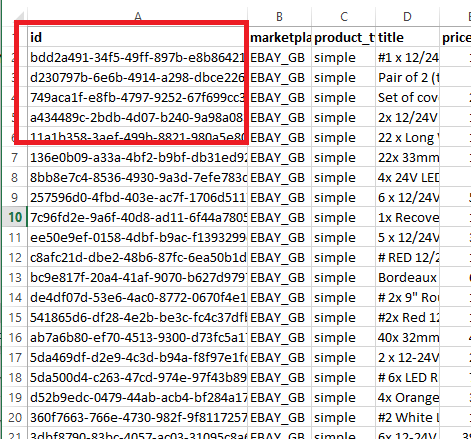
The first column contains the SellSetGo internal ID for each listing — a long alphanumeric string. Copy the IDs for all the listings you want to update.
Step 3: Create Your Update Spreadsheet
Create a new spreadsheet in Excel or Google Sheets with two columns:
- Column A header:
id - Column B header:
C: Brand(or whichever item specific you want to update — just prefix it withC:and notice the space after the colon)
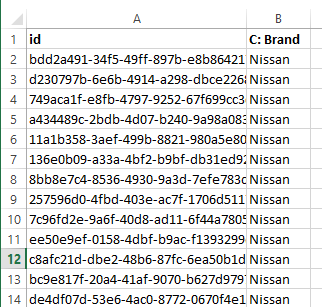
Paste the SellSetGo IDs into Column A (from Row 2 onwards), and enter the item specific value — for example, Nissan — in Column B for each row. You can include as many rows as you like, whether that’s 9 listings or 9,000.
Step 4: Save as CSV and Import into SellSetGo
Save the spreadsheet as a .csv file. In SellSetGo, go to Listings → Import CSV and click the Import button.
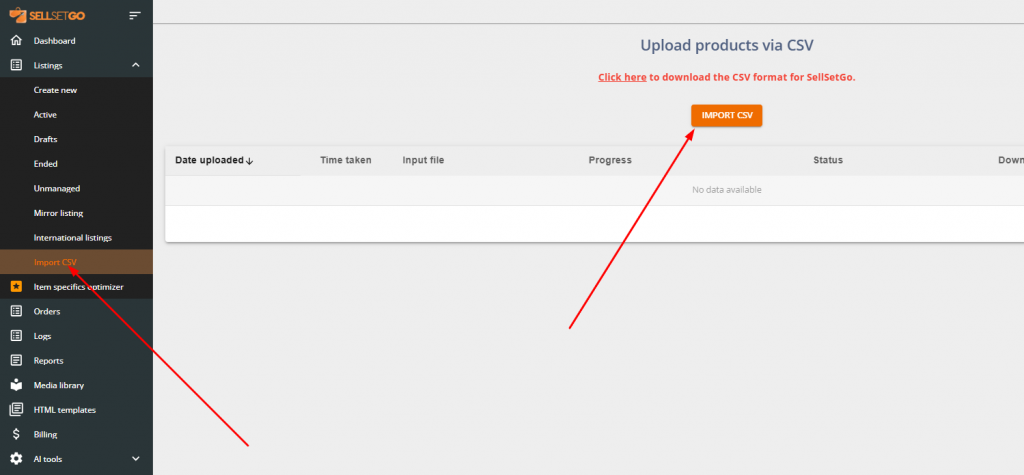
Upload your CSV — SellSetGo will automatically queue every listing in the file for revision on eBay.
Step 5: Check the Status of Your Upload
Refresh the Import CSV page to monitor progress. SellSetGo processes roughly 1 listing per second, so 10 listings take about 10 seconds, and 1,000 listings take around 17 minutes — completely hands-free.
Once the job completes, your item specifics will be live across all revised eBay listings.
Pro tip: This works for any item specific, not just Brand. Change the column header to C: <Item Specific Name> (e.g. C: Material, C: Colour) and fill in the values. You can even update multiple item specifics in one go by adding more columns to your CSV.
Yes, it really does take just a minute of your time to bulk update item specifics for thousands of eBay listings in SellSetGo.
If you have any questions on how to use our powerful eBay selling software, reach out to us by clicking here.